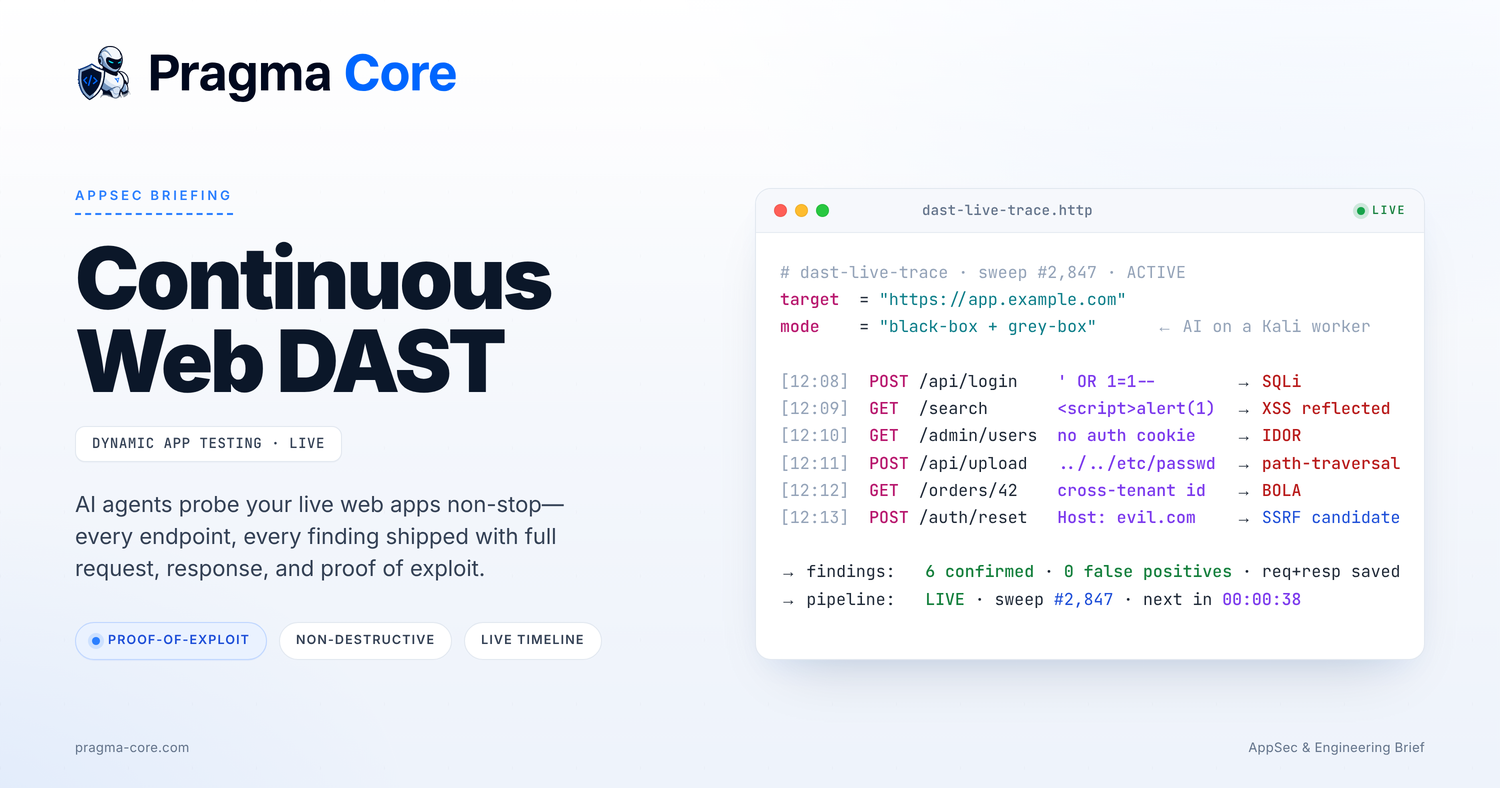
Every AppSec leader we talk to has roughly the same testing rhythm for their public-facing web apps. There is a vendor pentest once a year, sometimes twice. There is a DAST scanner that runs on a schedule and produces a long list of mostly unactionable tickets. And there is an engineering team in the middle, deploying changes every day, working on the assumption that the security tooling parked on the side of the pipeline will catch the things that matter.
In our experience, it does not. Not because the tooling is bad, but because the cadence is wrong and the output is noisy. The pentest is fresh for about a week after the report is delivered, then it ages. The scanner runs whether anything has changed or not, and produces findings that nobody on the engineering side trusts enough to triage with urgency.
This is the gap our continuous web DAST is built to close.
What we actually mean by continuous
Continuous, in this context, is not a marketing word. The agents run on Kali workers and probe the application as a permanent part of your environment. A typical customer is in the low thousands of sweeps after a few months. Sweep number 2,847 is not a stress test, it is a Tuesday afternoon.
Each sweep is an iteration over a slice of the attack surface. New endpoints that landed in the last deploy. Authentication and session flows. Object-level authorization on the endpoints that load user data. Upload paths, redirect handlers, anything that takes a URL or a host as input. The agents move through these systematically, with the goal of finding what an attacker would find given the same amount of time.
The next sweep is queued before the current one ends. There is no idle.
Black-box, grey-box, and what changes between them
The platform runs in two modes against the same target. In black-box mode the agents have no credentials and no internal context. They look at the application the way an unauthenticated attacker on the internet would. In grey-box mode they hold a set of scoped accounts and, where the customer provides it, a description of the authorization model.
The difference between the two is not academic. Most of the highest-impact findings in modern web applications are authorization bugs that require a logged-in session to reach. IDOR, BOLA, cross-tenant access on multi-tenant SaaS. You do not find those from the outside. You find them by holding two test accounts and asking whether account A can reach account B's data through any code path.
The agents run both modes against the same target, and findings from each are tagged so the engineering team knows what reach level was needed to trigger them.
What the agents look for
The detector set is built around the classes of bugs that actually get exploited in web applications. The trace from a typical sweep will show some mix of:
- SQL injection in login, search, filter, and reporting endpoints
- Reflected and stored XSS
- IDOR and BOLA across authenticated routes
- Path traversal in upload, download, and templating handlers
- SSRF candidates in webhook, fetch, image-proxy, and integration paths
- Open redirects in auth and OAuth flows
- Authentication and session bypass patterns
- Misconfigurations that expose internal endpoints or stack traces
This list is intentionally not exhaustive. The point is not to enumerate every class of issue that has ever been written about. The point is to cover the bugs that show up in real breaches and report them with enough evidence that the engineering team can fix them without a back-and-forth.
The thing we will not ship without
Every finding includes a proof of exploit. Not a payload that "looks like it might work." The actual request, the actual response, and a short description of what happened. If the agent cannot reproduce the issue cleanly, the finding does not leave the platform. We would rather miss a borderline case than send an engineering team a maybe.
This is the part that changes how the rest of the workflow runs. When a developer opens a finding, they get a curl command, the response they should expect, and the impact. They reproduce it locally, fix it, and re-run the verification. The ticket closes in hours, not weeks. The trust in the tooling stays intact, because the tooling earned it.
There is an honest tradeoff here. A scanner that flags everything will have higher recall on paper. We accept the tradeoff. False positives are not free. They cost a developer's afternoon every time one lands, and they erode the willingness of the engineering team to look at the next ticket. Over the lifetime of an AppSec program, the cost of noise is higher than the cost of a slightly tighter detector.
Non-destructive on production
The first question every team asks is whether they can run this against production. The answer is yes, and most of our customers do. The agents are explicitly built to avoid destructive operations. They will not run mass account creation. They will not exhaust databases with unbounded queries. They back off on rate limits and respect any constraints the customer sets at onboarding.
For teams that want belt-and-suspenders isolation, the same agents run against staging or a dedicated test environment. The detectors are identical. The only thing that changes is the target.
Where this fits with everything else
DAST is not a replacement for SAST, for SCA, or for human pentesting on the parts of the application that need a human. It catches a different category of bug. SAST sees what the code looks like. SCA sees what dependencies are in the tree. DAST sees how the application actually behaves at runtime, on the inputs an attacker would actually send.
On Pragma Core, all of these run against the same project. A SAST finding that maps to an exploitable runtime path gets correlated with the DAST evidence. A dependency CVE with a reachable path in your code is promoted in priority. The point of the platform is that these signals stop being separate dashboards and start being one picture.
The continuous DAST piece is one input into that picture. It happens to be the one that mirrors most closely what an attacker would do, which is why it tends to produce the findings that engineering teams move on first.
If you want to see what this looks like on one of your own applications, we can set up a sweep against a staging target and walk you through the output. It is the fastest way to decide whether this is the kind of signal your team would actually use.